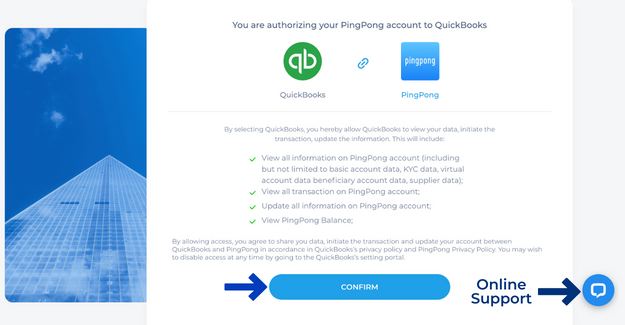
Once you have set up an account with PingPong you can connect to QuickBooks for seamless bill and invoice payments. To connect your QuickBooks account to PingPong, please follow the steps below.
Step 1: Log in to your PingPong Account
Stop 2: Click the profile icon on the top right corner and select Service Center from the dropdown menu.
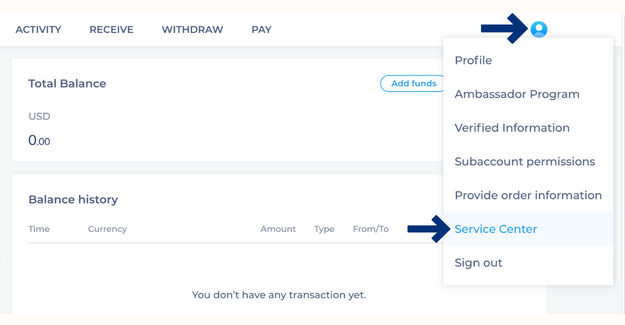
Step 3: In Integrations, you will see an option in the middle Connect to Quickbooks
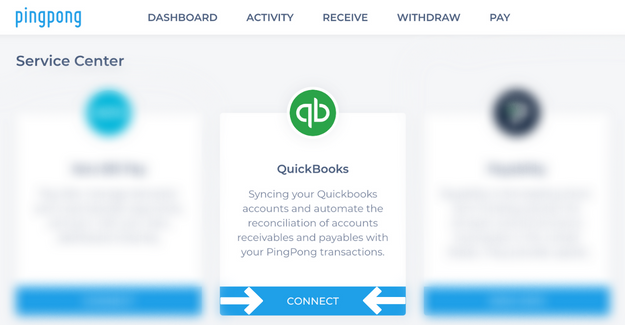
Step 4: Click Connect.
Step 5: Confirm your connection. You will be redirected to your Quickbooks account using your Quickbooks login credentials.
Step 6: Authorize the sharing of your data between PingPong and Quickbooks, by clicking Connect.
Voilà! You are now ready to sync your payment records in real time!
------------------------------------------------
Log in to your account and start to integrate with QBO
------------------------------------------------
Still need help? You can Email our Customer Success team here.
![PingPong_Logo [Blue]-3](https://x.intl.pingpongx.com/hubfs/PingPong_Logo%20%5BBlue%5D-3.png)